Markdown support
Draftail supports formatting content with Markdown markup. If you’ve never heard of Markdown this might sound like too much, but in reality it’s really simple, and makes for a much faster content editing experience, with less strange keyboard shortcuts to remember.
Markdown formatting isn’t actually being kept around in the editor – it just serves as a shortcut to format content faster. Here are a few examples:
Heading levels
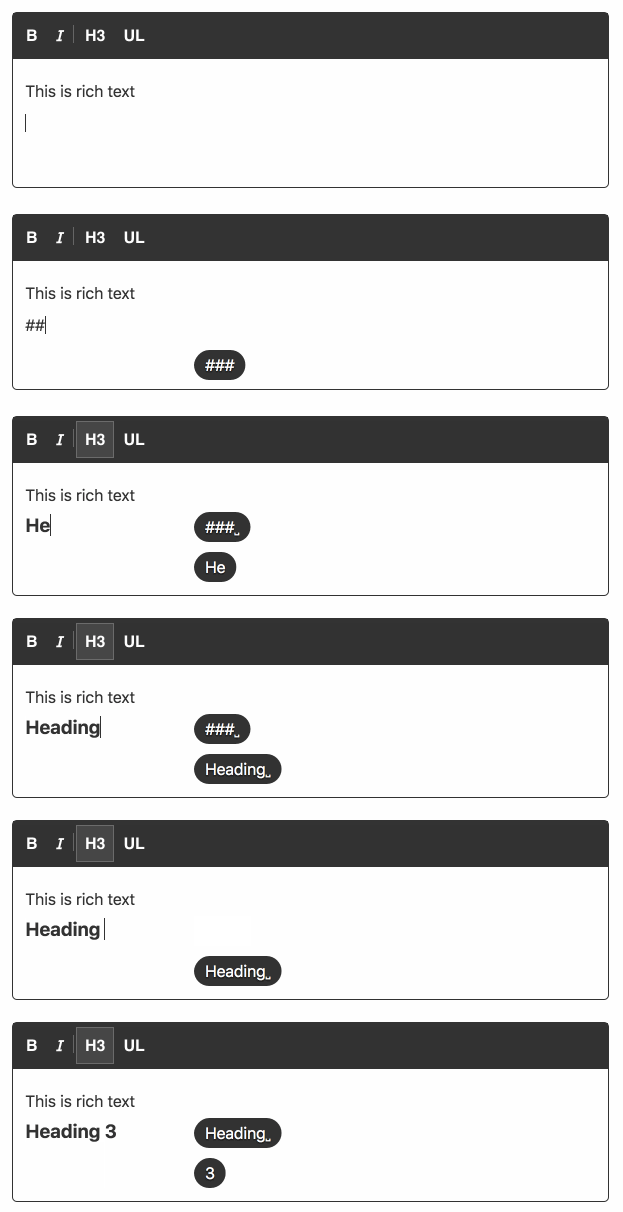
Heading levels can easily be formatted with the #, ##, ###, Markdown-style shortcuts. For a heading level 3, use three hash signs – ### followed by a space at the start of a line:
Bold, italic, and more
It’s also possible to use Markdown shortcuts for inline formatting, not just at the beginning of a line:
- Use
**double asterisks**for bold text. - Use
_underscores_for italicized text. - Use
~tilde~to strike through text.
Shortcut boundaries
Markdown shortcuts apply formatting as you type; they are not a full Markdown parser. For inline formatting, place the opening marker at the start of a block or after a space, and put the markers directly against the text:
**word**applies bold.** word**and**word **do not apply bold because of the space inside the markers.some**word**does not activate the shortcut because the opening marker follows a letter.
These boundaries reduce accidental formatting during normal typing. The corresponding format must be enabled in the editor. See the discussion of the shortcut whitespace rules for their rationale.
More shortcuts
Please have a look at the full list of keyboard shortcuts to see all supported Markdown shortcuts.